Enterprise Healthcare · 0 → 1 Workflow · Digital Voting · E-signatures · Systems Design
From Paper Signatures to Virtual Committees
Hospital credentialing committees ran on Excel, paper packets, and chasing physicians for signatures. I designed the end-to-end virtual committee workflow — digital voting, e-signatures, bulk clean-file approvals — validated across 10+ enterprise customers.
TL;DR — impact
- 42.5% account adoption (383 accounts, +21.6%) · visitors +42% YoY · page views +73% YoY (Pendo)
- First-time visitors to committee setup +13.3% — the feature pulls users into previously unused product areas
- Eliminated paper signatures, scanning, and physician chase-downs for hospital credentialing committees
- Validated across 10+ enterprise customers with three different committee mental models
“The electronic approval for my physician reviewers is amazing! Saves so much time.” — Credentialing specialist, Mercy Health
Context
In CredentialStream, the Committee Review process is where credentialed providers are approved by hospital medical-staff committees. Today, this process happens almost entirely outside the product — even though every report and document feeding it is generated inside it. Coordinators export data, run the meeting in person, take manual notes, then re-enter the outcome back into CredentialStream by hand.
The goal: eliminate that export → meeting → re-entry loop so coordinators oversee the process instead of doing the heavy lifting.
My role
I led the project end to end — defining the primary persona (the review coordinator), running both rounds of research, designing across multiple existing product surfaces, and stress-testing the system against three real customer orgs of very different shapes. The PM and engineering lead partnered on scope and feasibility; I owned the research synthesis, the interaction model, and the systemic decisions about what to build, defer, or leave configurable.
Two rounds of research, two different questions
Round 1 — problem discovery. I interviewed coordinators to learn how committees actually run today. The findings shaped everything that followed: a group of people is involved (coordinator, chair, members, MSO staff, department chairs); coordinators prepare a docket before the meeting; some committees serve a single facility, others are regional and shared across hospitals; there are multiple possible outcomes per provider — not a binary approve/deny.
Round 2 — usability testing. After designing, I ran walkthroughs with three customers: a 10-hospital system in transition, Sanford Health, and SCL Health / CommonSpirit. Each one operated differently — and the comparison surfaced the design’s real challenge.
The assumption-break
I went in with a clean assumption: committee members would log into the hub, view files, and vote individually — mirroring our existing reviewer workflow.
Sanford broke that assumption. They told me, plainly, they would not use individual electronic voting. They meet in person, discuss in the room, and want one admin to record the final disposition for the whole committee. “If the credentials chair had to go into 100 files, he’d quit.” Their committee members don’t review files at all — they review the agenda packet the MSO prepares.
CommonSpirit reinforced it: members review a table of red flags, claims, and review notes — not the appoint form I was sending them.
This wasn’t a usability bug. It was a mental-model mismatch with the core voting flow. The real problem wasn’t “build a committee feature.” It was “build a workflow configurable enough that Sanford’s record-the-outcome model and Kim’s vote-in-the-hub model both work in one system.”
What I designed — and why
Rather than pick one model, I designed the system to extend existing structures and let each org configure its own behavior:
- Committee Record area — multi-facility committee setup with inherited facility, role (chair/member), and term dates.
- “Mark as committee meeting” flag on the customer-customizable meeting type table — the system needs a reliable signal of which meeting is the real committee meeting, because customer meeting types are routinely mislabeled.
- Facility-specific toggle on the appoint template’s Credentials Committee line item — so orgs choose between “one shared decision” and “per-facility committee meetings” without forking the template.
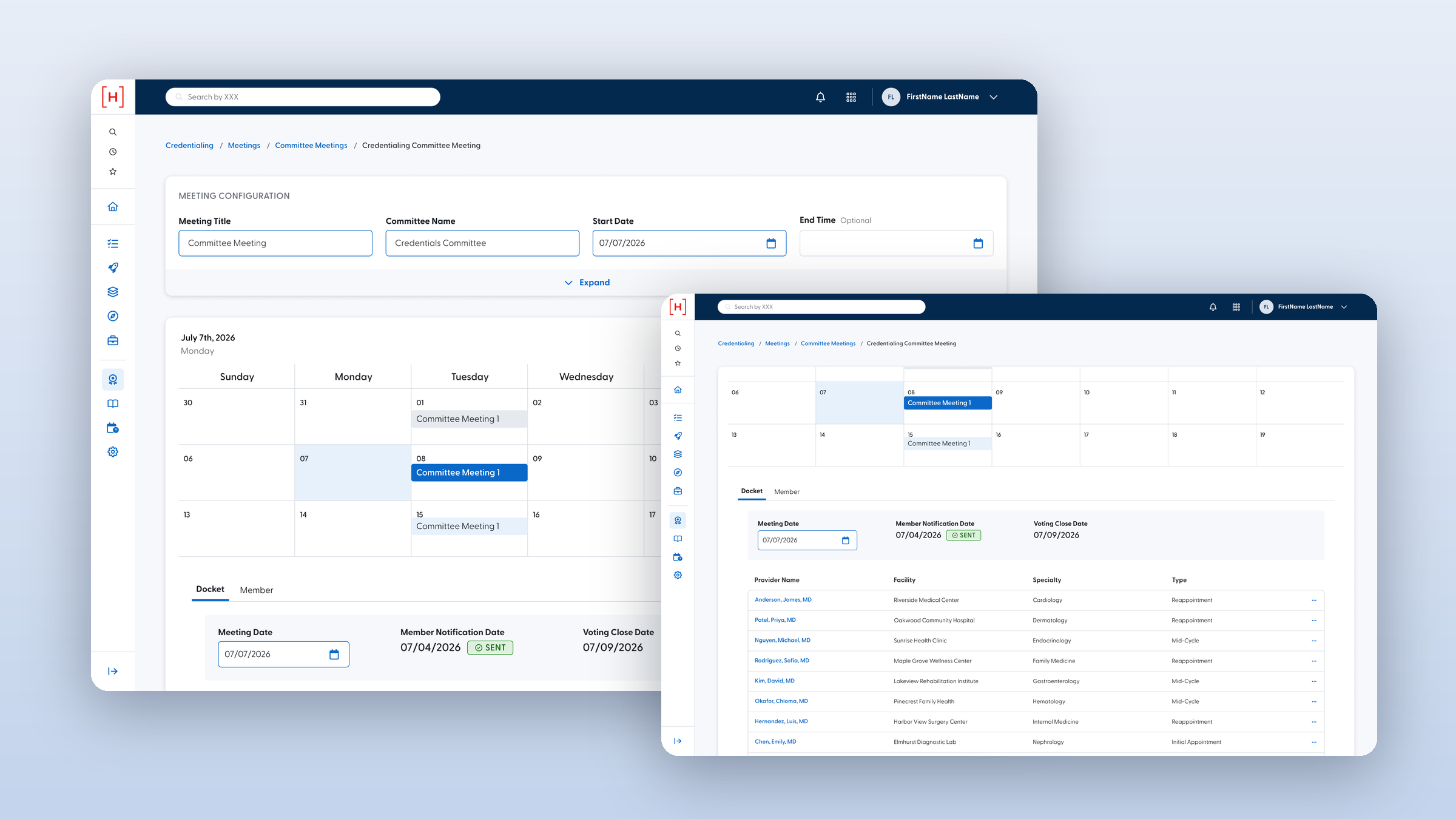
- Meeting detail view with inline docket — providers on the agenda, member attendance, and a provider-type column (initial / reappointment / mid-cycle) so committees can consent-agenda the clean reappointments and focus on the flagged ones.
- Hub committee review surface — read-only file access (V1 is deliberately view-only), three-state voting (Recommend / Recommend with Conditions / Do Not Recommend), required reasons on the negative paths, change-vote-until-lock, and bulk clean-recommend tied to the existing clean-file feature.
- CS-side committee tab — facility, date, attendees, votes, vote reasons, and the chair’s committee recommendation. Deliberately scoped as minutes-lite: enough for surveyors, narrow enough that private discussion stays out of the audit record.
Risk mitigation in a high-stakes workflow
Committee decisions are legally protected peer-review material. They feed Joint Commission surveys, MEC, and the board. Safety and data integrity were primary constraints, not afterthoughts:
- Sequential progression must hold. A provider can’t appear for MEC until they’ve cleared Credentials Committee — committee line items behave like sequential reviewer positions.
- Late-vote lock. A chair-triggered “final recommendation” locks voting, so a member logging in after the in-person quorum already decided can’t slip a non-kosher vote in.
- Read-only timing. Read-only committee members are placed after the final reviewer — they only see files that are intentionally surfaced for review.
- Member-can’t-vote-on-own-file. Anesthesia chair up for his own reappointment doesn’t vote on himself.
- Absent member doesn’t block. Chair-signed files move forward; an absent member isn’t a quorum blocker.
- Minutes-lite scope. Surveyors get committee + date + attendees + votes + recommendation. Private discussion stays in the org’s own minutes — peer-review confidentiality intact.
Systems thinking: extend, don’t break
A recurring principle: extend existing structures, don’t break live data. Three concrete examples:
- The committee record area exists today but most orgs don’t use it (data was migrated from a legacy product and never touched). That’s useful — it means we can evolve the screen without disrupting anyone’s live workflow.
- Recurrence and attendance are pulled forward from the existing meeting maintenance screen rather than rebuilt; committee meetings get their own tab so they don’t disturb the “default” meeting setup customers already rely on.
- The “mark as committee meeting” flag layers on top of the customer-customizable meeting type table — opt-in, doesn’t invalidate existing setups.
The big systemic move: the committee is treated like an extension of the reviewer concept. Coordinators already manage reviewer workflows from the CS side while reviewers act in the hub. The same mental model extends to committee members — one model, two surfaces.
Retention & ROI
The business case is concrete and grounded in the research:
- Eliminate the export → manual meeting → re-entry loop. Coordinators stop doing data plumbing and start overseeing.
- Standardize across regions. Sanford named this directly: today nurses cross-covering between four regions have to learn four different processes. One standard agenda and one standard committee surface cut onboarding cost and reduce “nothing gets missed” risk.
- Surveyor-ready by default. Joint Commission audits today require pulling together “half paper, half electronic” data. The committee tab solves it with one screen.
- Bulk clean-recommend keeps high-volume customers (102–150 reappointments per meeting) moving without forcing the chair into every file.
Where AI fits — and where it doesn’t
The current design ships no AI, and that is deliberate. Committee decisions are protected peer-review material with HIPAA-grade confidentiality and real legal exposure. What I documented as the AI roadmap is augmentation, never automation:
- Pre-classify clean vs. flagged files so the rubber-stamp triage is automatic but the decision stays human.
- Draft the docket agenda from structured data (status changes, resignations, name changes) — a coordinator edits; AI never publishes.
- Summarize discussion threads into draft minutes for the coordinator to review, not to file.
- Highlight quorum/holiday calendar conflicts before meetings get scheduled into a wall.
The ethical posture is consistent across my healthcare work: surface signals, never decide. Auto-rejecting a credentialing decision or auto-summarizing peer-review discussion crosses a line that’s both legal and clinical. Every AI signal must show the why, be overridable, and leave an audit record. AI reduces error; it does not remove agency.
On the workflow side, AI tools (Figma AI, Cursor for prototype scaffolding, AI-assisted transcript synthesis on the three usability sessions) compressed the research-to-design cycle materially — this very case study’s synthesis was AI-accelerated from raw transcripts.
Open questions I’m carrying forward
A few decisions I deliberately left unresolved at the end of V1 — they need org-by-org input we don’t have yet:
- Force individual voting vs. record-final-decision-only — likely a per-org setup, given Sanford and Kim land in opposite places.
- Provider-also-non-provider — the position table forces either/or, but the same role (Chief of Staff, CEO) may be credentialed at one facility and a community member at another. Solving this likely requires unifying provider and non-provider reviewer handling, and the “two hubs, two emails” problem behind it.
- Discussion board — out of V1 to keep the committee surface read-only, but every customer wants it for tracking conditions and defer history.
Reflection
The biggest lesson was about scope. My first design assumed one mental model. The research showed me three. The mature answer wasn’t to pick one — it was to design a system configurable enough to serve all of them without forcing the worst-fit org into the wrong workflow. The next time I’m designing for a domain this variable, I’d run a cross-customer comparison before I draft a single screen.
The original ask was: build a committee feature. The actual outcome was: redraw the boundary between what CredentialStream does and what coordinators do — make that boundary configurable per org, surveyor-ready by default, and structurally ready for the AI augmentation that’s coming next.